







In this modern day and age, time is of the essence. It does not matter whether one is typing an essay or preparing reports; delays are detrimental to productivity. The conventional office packages tend to be bloated. They add too many tools and consume system memory. It should not take minutes to open a Word document and crash your system.
The current work requires fast loading, smooth running, and responsive software. This is where WPS Office comes in. It provides all that is required in word processing without the bloat. WPS Office is the best option to use a space-saving and time-saving Word alternative.
This is a lightweight office suite that does not slow down your system. Rather, it muscles through activities and makes things quick and straightforward. A world where people multitask is the order of the day, and it is important to select software that will not slow down your system.
Minimal Installation, Maximum Performance
WPS Office takes only minutes to install. It has a file size that is significantly smaller than that of Microsoft Word. You will not have to make room by clearing space or uninstalling other programs. When installed, it opens quickly. There is no freezing or loading lag even on older laptops or low-RAM systems.
The interface is clean and recognizable. It has the feel of Microsoft Word, but with less of a load on system resources. You are able to open big documents without lag. No crashing. No frustration. WPS Office is efficient and more potent with less weight.

All-in-One Suite Without Resource Drain
Rather than opting to download Word software alone, opt to use WPS Office to get an all-in-one solution. It allows you to work on spreadsheets, presentations, and PDFs alongside editing Word files without opening several apps or consuming a lot of RAM. Hence, making your workflow seamless and uninterrupted.
Its multitasking is smooth due to its background optimization. The system remains stable even when there are several tabs open. It is an all-inclusive pack that keeps your workflow organized. You will not feel a memory or performance drain. WPS Office is not only light, but it is also not stingy with features.
Fully Featured Word Editor Without Compromise
Although it is lightweight, WPS Writer provides all the features you want. Fonts, style, margins, and tables are easy to select and insert. The interface is similar to Microsoft Word and it does not have a learning curve.
WPS Writer has extra features. OCR allows you to convert pictures to editable text. AI spell checks grammar and improves clarity. It is even possible to retrieve unsaved files. In contrast to certain free editors, WPS does not eliminate advanced features. It is all there, free and fully functional.
You also obtain free templates. Write resumes, letters, or reports without the time-consuming process of beginning with a blank page. Each template is in .doc and .docx file formats, and it is customizable.
How to Edit Word Documents in WPS Office in 3 Simple Steps
Step 1: Launch WPS Office and Start Writing
Open WPS Office, click on “Docs,” and choose either a blank file or a lightweight template to begin writing without lag.
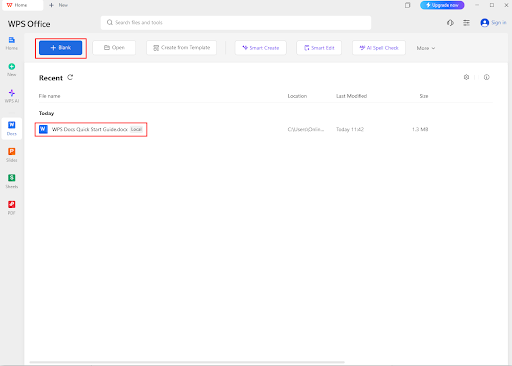
Step 2: Load or Create a Word File Quickly
Use the “Open” option in the toolbar to access existing .doc/.docx files or start a new document effortlessly.
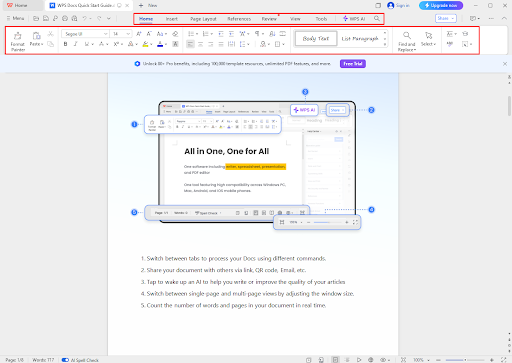
Step 3: Edit Smoothly and Save Your Work
Make edits using WPS’s efficient tools that run smoothly even on low-spec devices. Save your document in Word format or export as PDF.
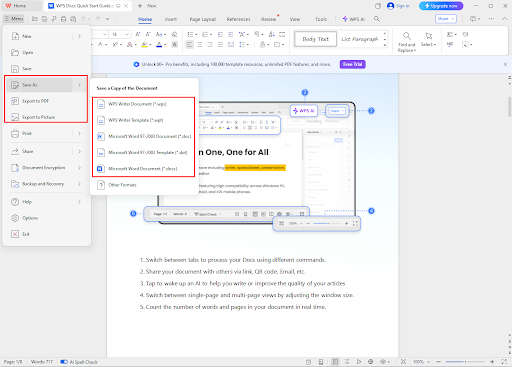
Compatibility Without the Clutter
WPS Office ensures full compatibility with all Microsoft Word versions. That includes Word 365, 2021, 2019, 2016, and even older versions. You can open Word files without losing formatting. Fonts, styles, tables, and layouts all stay exactly how they should. You don’t need to adjust anything manually.
There’s no need to install extra plugins or tools. WPS handles every file type with ease. You get smooth performance and accurate formatting, no matter how complex the document.
You won’t waste time fixing errors or broken layouts. Everything just works. You can trust WPS to open, edit, and save Word files seamlessly. Even documents with images, headers, footnotes, or hyperlinks maintain their structure.
It’s a smart, lightweight Word alternative. It saves your system’s resources while giving you the full feature set. You can edit confidently, knowing your content stays professional. Whether you’re working on reports, resumes, or letters, you get clarity, stability, and simplicity in one place.
WPS Cloud and Mobile Sync – Low Memory, High Productivity
WPS Office isn’t limited to desktops. Save your documents directly to Google Drive, Dropbox, or WPS Cloud. Access the same file across multiple devices instantly. Start writing on your laptop and continue on your phone with no interruptions.
Mobile versions of WPS Office are equally optimized. They don’t require large storage or high specs. You can edit, comment, and share files on the go. It works well even on budget smartphones. Collaboration becomes effortless with real-time updates and synced files.
Optimized for All Operating Systems
WPS Office runs on all major platforms. Whether on Windows, macOS, Linux, Android, or iOS, performance stays consistent. Every version is tailored for the operating system it’s built for. That means faster load times, better compatibility, and smoother editing.
You don’t have to worry about switching devices. Use one WPS account to sync across platforms. Files, settings, and edits travel with you. This cross-platform support ensures you stay productive, regardless of the device in hand.
Conclusion
Heavy office software often slows progress. Long installation, frequent crashes, and resource drain reduce efficiency. WPS Office changes that. It provides a fast, reliable, and fully featured experience in a lightweight package. You no longer need to choose between speed and features. WPS Office offers both. With full Microsoft Word compatibility, advanced tools, and cloud sync, you get more from less. The interface is familiar. The system stays fast. The documents look perfect.
Whether editing on a desktop or phone, WPS Office keeps the experience smooth. Free forever, WPS lets you create, edit, and share without limits. For those seeking a smart Word download, WPS Office proves that small can be powerful. Start working smarter today with a tool that matches your pace.